
Ergonomic Setup for Remote Workers: Avoid Neck & Upper-Back Strain
Updated: Jul 22
Working from home shouldn't mean working in pain. Poor desk posture, screen height, and seating can create neck tension, upper-back stiffness, and even long-term spinal stress — often without you noticing until it's already built up.
I put this guide together specifically for remote and hybrid workers, because a home setup usually doesn't get the same thought a proper office desk does. A dining chair, a laptop balanced on a coffee table, a monitor that's really just wherever it fits — these small compromises add up fast.
How an Ergonomic Setup Improves Health
A proper ergonomic setup isn't just about comfort — it changes how your spine and nervous system handle an entire workday. When your workstation supports a neutral spine, your muscles don't have to compensate constantly just to hold you upright, which means less accumulated tension by 5pm and less strain building up week over week.
Key Elements of an Ergonomic Workspace
Here's how to support your body while staying productive:
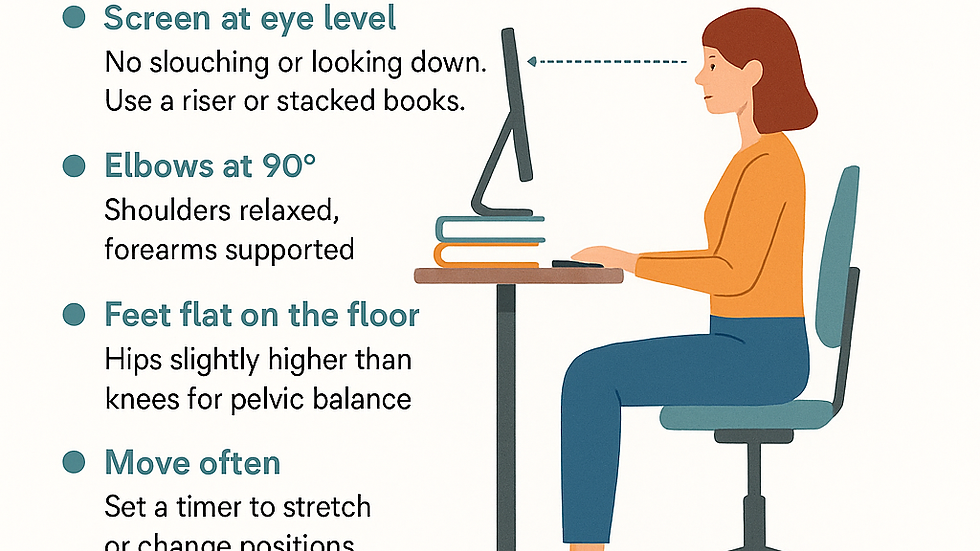
🔹 Screen at eye level — No slouching or looking down. Use a riser, a stack of books, or an adjustable monitor arm to get your screen height right. The top third of your screen should sit roughly at eye level.
🔹 Elbows at 90° — Keep shoulders relaxed and forearms supported on the desk or armrests. If your elbows are constantly reaching up or down to type, that tension travels straight into your neck and shoulders.
🔹 Feet flat on the floor — Hips should sit slightly higher than your knees for good pelvic balance. If your chair's too high, a footrest (or a sturdy box) does the job.
🔹 Move often — Set a timer to stretch or change position every 30–45 minutes. Even standing up for 60 seconds resets the load on your spine.
🔹 Breathe — Shallow chest breathing increases tension throughout your upper body. Practising slower, deeper breaths through your day helps reset posture and calm your nervous system at the same time.
Getting the Details Right
The five points above cover the essentials, but a few specifics make a real difference:
Your chair matters more than your desk. If you can only upgrade one thing, make it your chair. Look for adjustable height, decent lumbar support, and armrests that let your shoulders stay relaxed rather than shrugged.
Laptops need help. A laptop screen sitting on a table puts your neck into a forward-bent position almost by design. If you're working from a laptop full-time, an external monitor (or at minimum a laptop stand plus an external keyboard) makes the single biggest difference of anything on this list.
Standing desks aren't a fix on their own. Alternating between sitting and standing is genuinely useful, but standing all day with poor posture just moves the strain elsewhere. The goal is variation with good alignment, not standing for its own sake.
"Tech neck" adds up. Checking your phone with your head tilted forward for even a few minutes, repeated dozens of times a day, places meaningful cumulative load on your neck. Try to bring the phone up to eye level rather than dropping your head down to it.
The Role of Stretches and Breaks
Taking regular breaks is genuinely important — not just good advice to feel virtuous about. Stretching helps release tension before it settles into your muscles and fascia. A few simple additions to your day:
Neck rolls — slow, gentle, both directions
Shoulder shrugs and rolls — release built-up tension around the traps
Wrist and forearm stretches — especially useful if you're typing for long stretches
A short walk — even a lap around the house resets your spine's loading pattern
A few minutes of this, spread through the day, makes a genuinely noticeable difference.
When an Ergonomic Setup Isn't Enough
Even a well-set-up workspace can't undo years of postural patterns, old injuries, or a nervous system that's stuck holding tension. If you're already feeling ongoing strain despite doing everything right at your desk, that's usually a sign it's worth getting your spine properly assessed rather than continuing to adjust chair height. Chiropractic care can help restore motion and release built-up tension in ways a better desk setup alone can't reach — I go into more depth on that connection in Your Nervous System: The Hidden Superhighway Running Your Life.
If you want to check where you're starting from, try the 2-minute posture self-check — it's a useful companion to everything in this guide.
Frequently Asked Questions
What's the single most important ergonomic change for remote workers? Getting your screen to eye level, usually via a monitor riser or laptop stand, tends to make the biggest immediate difference for neck strain, since it removes the constant forward head tilt that builds up over a workday.
Is a standing desk better than a sitting desk? Neither is inherently better — what matters most is variation and posture within whichever position you're in. Alternating between sitting and standing throughout the day tends to be more helpful than committing fully to either.
How often should I take breaks when working from home? Aim for a movement break every 30–45 minutes, even if it's just standing up and stretching for a minute. Short, frequent breaks are more effective than one long break at the end of the day.
Can a better desk setup fix existing neck or back pain? It can prevent things from getting worse and ease mild tension, but if pain is already established, a good setup alone often isn't enough. A chiropractic assessment can identify what's actually driving the discomfort.
Do I really need to buy expensive ergonomic furniture? Not necessarily. A stack of books under a laptop, a rolled towel for lumbar support, or a firm cushion to adjust seat height can solve a lot of the same problems as pricier gear. Getting the fundamentals right matters more than the price tag.
Get the Full Visual Guide
I've put together a free downloadable guide covering everything in this post, laid out so you can pin it up next to your desk as a quick reference.
📥 Download the Ergonomics Visual Guide — free, no strings attached, just genuinely useful.
Ready to Take the Next Step?
Creating an ergonomic setup is one of the simplest, most effective things you can do for your daily comfort — but it works best alongside a body that's actually able to hold good posture without fighting itself.
Want to check your posture or get personalised advice? Book a consult here in Māngere, or take the Nervous System Regulation Quiz if you're not sure where to start.
About the Author
Dr Anupa Dharamsi is the founder and lead chiropractor at Handcrafted Chiropractic in Māngere, Auckland — a nervous-system-focused, trauma-informed practice supporting patients across South Auckland with a whole-body approach to care, nutrition, and long-term resilience.


Comments